UnReal Realtime Experience

Step into the captivating world of “UnReal Realtime Experience: Explorations and Customization.”
This unique platform blends cutting-edge technology with boundless creativity, transcending traditional boundaries to redefine reality.

Immerse yourself in the dynamic synergy of art and technology, where real-time experiences unfold, pushing the limits of what is possible.

Within this immersive landscape, customization takes center stage, providing individuals with the tools to shape their own encounters.

The journey ahead promises a brief yet impactful exploration, where the ordinary transforms into the extraordinary, setting the stage for a new era in personalized, interactive narratives.

Join us as we navigate the uncharted territories of this groundbreaking experience, where creativity knows no bounds and reality is redefined at every turn.

Understanding Unreal Engine
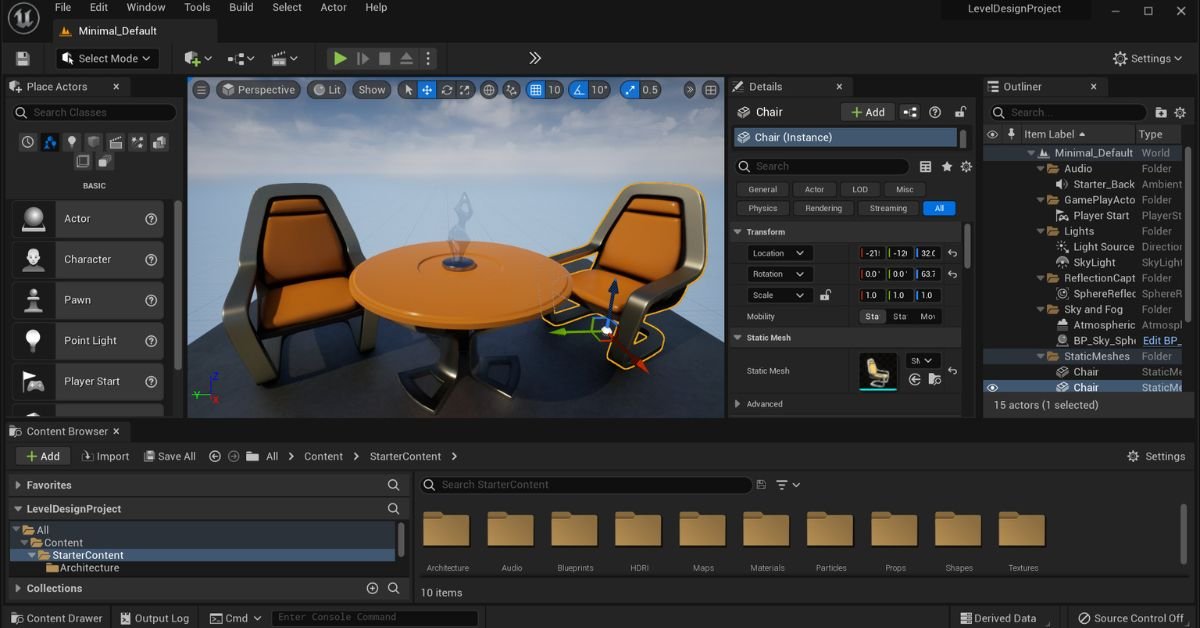
Understanding Unreal Engine

Unreal Engine, developed by Epic Games, has a rich history that dates back to its initial release in 1998. Originally designed for first-person shooters, the engine has undergone significant evolution over the years. Explore the journey of Unreal Engine from its early versions to the cutting-edge technology it is today.

Core Features and Capabilities of Unreal Engine for Real-time Experiences

Unreal Engine stands out for its robust set of features that empower developers to create immersive real-time experiences.

Delve into the core capabilities, such as high-quality graphics, real-time physics, and advanced lighting, that make Unreal Engine a powerhouse for a wide range of applications.

Examples of Industries and Applications Utilizing Unreal Engine for Real-time Content

Unreal Engine has found applications across diverse industries. Examine real-world examples of how Unreal Engine is employed in areas like film production, architecture, automotive design, and more. Discover the versatility and impact of Unreal Engine on shaping real-time content across different sectors.

Exploring Real-time Experiences

Unreal Engine has become a driving force behind the evolution of virtual and augmented reality. Uncover the role of Unreal Engine in shaping the VR and AR landscape.

Explore the immersive experiences created for VR headsets and AR devices, showcasing the engine’s adaptability to cutting-edge technologies.

Gaming and Simulation

Unreal Engine has long been synonymous with the gaming industry. Delve into how the engine has revolutionized the gaming experience, offering developers tools to create realistic environments, captivating storylines, and engaging gameplay. Additionally, explore the use of Unreal Engine in simulations for training and educational purposes.

 Customization in Unreal Engine

 Customization in Unreal Engine

Unreal Engine provides a wealth of customization features that allow developers to tailor experiences to their specific needs.

Investigate the engine’s customization options, including modifiable assets, scripting capabilities, and adaptive user interfaces, enabling developers to create unique and personalized content.

Case Studies on Customizing Real-time Experiences for Specific Industries

Examine real-world case studies highlighting instances where customization in Unreal Engine has been pivotal. Explore how industries such as architecture, healthcare, and education have leveraged customization features to address their unique requirements and deliver tailored real-time experiences.

Importance of Customization in Enhancing User Engagement and Immersion

Customization plays a crucial role in elevating user engagement and immersion. Understand why the ability to tailor experiences is essential for creating compelling content.

Explore how customization fosters a more personalized and engaging user experience, contributing to the success of projects developed on Unreal Engine.

Unreal Engine and Industry Applications

Unreal Engine has revolutionized the film and entertainment industry by offering unprecedented possibilities in real-time filmmaking.

The engine’s capabilities allow filmmakers to create virtual environments, characters, and special effects in real-time, enhancing the efficiency and creativity of the filmmaking process.

With examples like “The Mandalorian” utilizing Unreal Engine for virtual sets, the industry has witnessed a paradigm shift in how visual storytelling is approached.

 Architecture and Design

In the realm of architecture and design, Unreal Engine serves as a powerful tool for creating real-time architectural visualizations. Architects and designers can immerse themselves and their clients in interactive 3D environments, enabling a more comprehensive understanding of spatial designs.

The customization options provided by Unreal Engine empower professionals to tailor experiences to specific project requirements, fostering a new era of creativity and precision in architectural visualization.

Challenges and Future Trends

Despite the remarkable capabilities of Unreal Engine, challenges persist in implementing seamless real-time experiences. Issues such as hardware limitations, optimization complexities, and ensuring cross-platform compatibility are ongoing concerns.

Overcoming these challenges requires collaborative efforts from developers, hardware manufacturers, and industry stakeholders.

Emerging trends and innovations in Unreal Engine

Unreal Engine continues to evolve, introducing cutting-edge trends and innovations. Real-time ray tracing, enhanced AI integration, and improved collaboration tools are some of the recent advancements.

These innovations not only elevate the quality of real-time experiences but also open new possibilities for industries to push creative boundaries and deliver immersive content.

Predictions for the future of real-time experiences and customization

Looking ahead, the future of real-time experiences in Unreal Engine appears promising. Predictions include increased integration of AI for dynamic content generation, expanded use of virtual and augmented reality in diverse industries, and broader adoption of Unreal Engine for real-time collaborative projects.

Customization is expected to play a pivotal role, allowing users to tailor experiences according to their unique preferences and requirements.

 Conclusion

In conclusion, the “UnReal Realtime Experience” is a game-changer across various industries. Unreal Engine’s ability to provide real-time rendering, customization, and immersive experiences has redefined how content is created and consumed. Whether in film, architecture, gaming, or other sectors, the impact of real-time experiences cannot be overstated.

As we reflect on the significance of Unreal Engine in delivering unparalleled real-time experiences, the call to action is clear. Developers and designers are encouraged to explore the vast capabilities of Unreal Engine, pushing the boundaries of creativity and innovation.

Industries, too, should leverage Unreal Engine to transform their content creation processes, embracing the power of real-time experiences to captivate audiences and stay at the forefront of technological advancements.

The journey into the realm of “UnReal Realtime Experience” awaits, and it’s time for all stakeholders to embark on this exciting exploration.

Virtual Tour Marketing

Meta title: Virtual tour marketing in Architecture


In today’s rapidly evolving digital landscape, you might be seeking effective ways to showcase your business or property online. That’s where “Virtual Tour Marketing” comes into play. It’s a solution to the growing need for immersive online experiences, especially in sectors like real estate, hospitality, and education. With physical restrictions or geographical barriers, a comprehensive virtual tour can be a game-changer for your business.


Virtual tour marketing is an innovative strategy that uses 360-degree photography, virtual reality, and interactive features to create immersive, digital experiences of physical spaces. This approach enhances online engagement, broadens customer reach, and provides a competitive edge in digital marketing.


The information in this blog will delve into the core aspects of virtual tour marketing. From understanding its essence, exploring key technologies, to uncovering its myriad benefits for businesses, this blog is a treasure trove of insights. If you’re looking to elevate your digital presence and engage your audience in a novel way, the insights here will be invaluable.

What is Virtual Tour Marketing?


Virtual tour marketing utilizes digital technology to create a simulated environment. It’s not just about viewing images; it’s an interactive experience where you can navigate and explore as if you’re physically there.

Think of it as Google Street View, but for businesses and properties. This technology has been a game-changer in how companies reach out to their audience, especially in these times when physical distancing is part of our daily lives.

Now, you might be wondering, “How does this actually work?” It starts with capturing high-quality 360-degree images or videos of a location. These visuals are then stitched together using specialized software to create a seamless virtual environment.

The beauty of this technology is its versatility. It can be accessed on various devices, from computers to smartphones, and even with VR headsets for a more immersive experience.

Key Technologies Behind Virtual Tour Marketing

360-Degree Photography/Video

When diving into the world of virtual tour marketing, the first thing you’ll encounter is 360-degree photography and video.

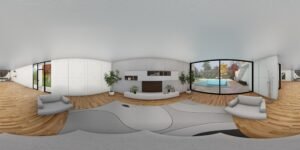
This isn’t your average photo or video; it’s a complete panoramic view that captures every angle of a space. Imagine being able to see not just in front of you, but also above, below, and all around that’s the magic of 360-degree visuals.

These images and videos are the foundation of any virtual tour, providing a realistic and immersive experience. They are stitched together meticulously to create a seamless virtual environment. It’s like painting a vivid picture of a location, but instead of brushstrokes, it’s pixels that bring the scene to life.

Virtual Reality Equipment

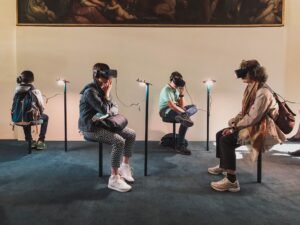
Next up is Virtual Reality (VR) equipment, which elevates the virtual tour experience to new heights. Have you ever donned a VR headset and felt transported to a different world? That’s the power of VR in virtual tour marketing.

It’s not just about seeing a space; it’s about being immersed in it. With VR headsets, users can interact with the environment in a more tactile and engaging way.

They can virtually walk through a space, turn their heads to look around, and even interact with certain elements. VR takes the static experience of viewing a screen and turns it into an interactive adventure.

Augmented Reality Features

Augmented Reality (AR) adds another layer of interaction to virtual tours. Unlike VR, which creates a completely immersive virtual environment, AR brings digital elements into the real world.

With AR, you can project virtual objects or information into your physical space. Think of looking at a room through your smartphone and seeing information pop up about the objects in it, or virtual furniture appearing in an empty space to help visualize interior design.

AR in virtual tours can provide additional context, enhance storytelling, and make the experience more informative and engaging.

Interactive Maps/Navigational Tools

Navigational Tools are crucial for guiding users through a virtual tour. Just like a map in a video game or a navigation app in your car, these tools help you understand where you are in the virtual space and where you can go.

They allow you to jump to different parts of the tour, get an overview of the area, and navigate with ease. Interactive maps and navigational tools make virtual tours user-friendly, especially for first-time users who might be unfamiliar with navigating virtual spaces.

High-Resolution Imaging Software

High-resolution imaging software is the unsung hero of virtual tour marketing. This software is critical in ensuring that every detail of your 360-degree photos and videos is crisp and clear.

This software not only enhances the quality of the images but also helps in stitching them together seamlessly, creating a fluid and lifelike tour. High-resolution imaging is essential because, in the world of virtual tours, the finer details can make a significant impact on the user’s experience.

Web Development Platforms

Web development platforms are where your virtual tour comes to life on the internet. These platforms are the backbone that hosts and displays your virtual tour. They need to be robust, reliable, and capable of handling high-quality graphics and interactive elements without compromising on speed or user experience.

A good web development platform ensures that your virtual tour is accessible to anyone with an internet connection, on any device. This universality is crucial because it expands your reach, allowing more potential customers to experience your virtual space from anywhere in the world.

Cloud Computing Solutions

Cloud computing solutions play a pivotal role in storing and managing the data involved in virtual tours.

High-quality 360-degree images and videos are data-heavy, and managing this data efficiently is crucial. Cloud computing offers a scalable and secure way to store this data. It also provides the necessary computing power to process and render these large files smoothly.

With cloud computing, you ensure that your virtual tours are not only high quality but also reliably accessible to your audience, regardless of traffic spikes or other technical demands.

AI & Machine Learning

AI and machine learning are the cutting-edge technologies that are starting to make their mark in virtual tour marketing. They open up possibilities for personalizing the user experience.

For instance, machine learning algorithms can analyze how users interact with your tour and then adjust the content to suit their preferences. Imagine a virtual real estate tour that learns what style of home a user likes and then suggests similar properties they might be interested in.

AI can also be used for natural language processing, allowing users to interact with the tour using voice commands. This level of personalization and interaction is what sets apart advanced virtual tours and makes them more engaging and effective.

Benefits of Virtual Tours for Businesses

  • Enhanced Customer Engagement: Virtual tours captivate potential customers much more effectively than traditional photos or videos. They offer an immersive experience, making users feel like they are actually exploring the space. This heightened engagement can lead to longer visit times on your website and deeper interest in your offerings.
  • Wider Reach: With a virtual tour, your business breaks the geographical barriers. Anyone from anywhere can visit your space virtually, expanding your reach far beyond local customers. This global accessibility is particularly beneficial for businesses like real estate, hotels, and tourist attractions.
  • Cost-Effective Marketing: Once created, virtual tours are an incredibly cost-effective marketing tool. They don’t require regular updates and can be used across multiple platforms, from your website to social media, providing a high return on investment.
  • Increased Transparency and Trust: By allowing potential customers to explore your space in detail, virtual tours build trust. Customers appreciate the transparency of being able to examine a space thoroughly online, which can be a decisive factor in their purchase decision.
  • Competitive Edge: In a market where many businesses still rely on traditional marketing methods, offering a virtual tour can set you apart. It positions your brand as innovative and customer-centric, giving you a competitive edge.
  • Analytics and Insight: Virtual tours can be integrated with analytics tools, providing valuable insights into how users interact with your tour. This data can inform business strategies and help in understanding customer preferences.
  • Reduced Need for In-Person Visits: Especially beneficial in times of social distancing, virtual tours reduce the need for in-person visits. This is not only convenient for customers but also expands the pool of potential clients who can ‘visit’ your space.
  • Enhanced Online Presence: A virtual tour can significantly improve your online presence, making your website more interactive and engaging. This can lead to better search engine rankings and increased online visibility.

Conclusion

Virtual tour marketing represents the future of digital engagement, combining cutting-edge technology with creative marketing strategies to bring physical spaces to life online.

In conclusion, whether you’re just starting to explore the world of virtual tour marketing or looking to enhance your existing strategies, remember that the key is to create immersive, engaging, and informative experiences that resonate with your audience.

With the right approach, virtual tour marketing can open doors to new possibilities, helping your business to thrive in the digital age.

Benefits of Virtual Reality in Architecture

In the fast-evolving world of architecture, one of the most significant challenges is bridging the gap between vision and reality. You, as a reader, might be exploring how cutting-edge technology can revolutionize the way buildings are designed and experienced. The integration of Virtual Reality (VR) into architecture has emerged as a groundbreaking solution to this challenge, offering tools and techniques that were once the stuff of science fiction.


VR in architecture facilitates enhanced visualization of designs, efficient project planning, improved client communication, and immersive design experiences, all of which lead to better-informed decisions and innovative architectural solutions.


This blog post delves into the myriad benefits of VR in architecture, ranging from improved design visualization and client engagement to innovative training applications and sustainable design.

You’ll discover how VR is not just a tool but a paradigm shift in architectural practices, empowering professionals and clients alike with a deeper understanding and interaction with architectural designs.

8 Benefits of Virtual Reality in Architecture

Enhanced Visualization of Designs

Imagine stepping into a building before it’s even built. That’s what Virtual Reality (VR) offers in architecture – a chance to visualize designs in a fully immersive 3D environment. It’s like having a crystal ball, allowing architects and clients to see and feel the space, understand the scale, textures, and lighting, and make informed decisions.

The level of detail is astounding, providing a real sense of presence inside the virtual model. It’s a game-changer for design accuracy and client satisfaction.

Efficient Design Modification and Prototyping

Changes are inevitable in architectural design. But with VR, modifications become less of a headache. You can quickly iterate designs, test different scenarios, and see the impact of changes instantly. This efficiency not only saves time but also significantly reduces costs associated with traditional prototyping methods. In my experience, using VR for prototyping has streamlined the design process, making it more agile and responsive to changes.

Client Engagement and Communication


Ever tried explaining a complex architectural concept with just blueprints and 3D renderings? It can be challenging, right? VR changes this narrative. It creates a shared language between architects and clients, making communication more effective.

When clients put on a VR headset, they step into your vision. They can explore, ask questions, and provide feedback in real-time. This interactive experience not only builds trust but also ensures that the final product aligns closely with the client’s expectations.

Virtual Walkthroughs

Now, this is where VR truly shines in architecture. Virtual walkthroughs are not just visually immersive; they engage all senses, providing a feel for the texture, acoustics, and even the ambiance of a space.

This immersion helps in identifying potential design flaws that might be missed in 2D renderings. It’s an invaluable tool for finalizing design elements and ensuring the space not only looks good on paper but also feels right in reality.

Cost Reduction and Resource Optimization

Think about the traditional architectural process – it involves a lot of physical materials, travel, and time-consuming revisions, right? Here’s where VR steps in as a cost-saving hero. By creating virtual models, the need for expensive physical models and extensive site visits is significantly reduced.

This not only cuts down on material costs but also on the time and resources spent in revising designs.

Plus, it minimizes the risk of costly errors in the construction phase. In my view, VR is a smart investment for any architecture firm looking to optimize resources and reduce overall project costs.

Remote Collaboration and Global Participation

The world of architecture is no longer confined to local boundaries, thanks to VR. Remote collaboration has become a seamless reality. Architects, clients, and stakeholders from across the globe can meet in a virtual space, discuss, and work on the same project in real-time.

This global participation broadens the talent pool, brings diverse perspectives to the table, and enhances the quality of architectural projects. It’s fascinating how VR bridges geographical gaps, fostering a more collaborative and inclusive approach to architectural design.

Sustainable Design and Environmental Impact

Sustainability is a buzzword in every industry, and architecture is no exception. VR plays a pivotal role here. It allows architects to simulate and analyze environmental factors like sunlight, ventilation, and energy efficiency, ensuring that the designs are sustainable and eco-friendly.

This proactive approach to sustainability can significantly reduce a building’s carbon footprint. Personally, I find this aspect of VR in architecture particularly impactful, as it aligns with the global shift towards more environmentally responsible practices.

Training and Educational Applications

VR has revolutionized architectural education and training. It offers students and young professionals a hands-on experience with realistic design scenarios, something that textbooks and traditional classrooms can’t match.

They can experiment, learn from mistakes, and understand complex architectural concepts in a risk-free virtual environment.

This practical approach to learning not only enhances their skills but also prepares them for the real-world challenges of architecture. As someone passionate about education, I see VR as an invaluable tool in shaping the architects of tomorrow.

Applications of Virtual Reality in Architecture

Design Visualization

Architects can now create and explore their designs in a fully immersive 3D environment. This allows for a more comprehensive understanding of how different elements come together in a space.

You can walk through your creation, inspecting every corner, experiencing the play of light and shadows, and getting a real sense of the building’s scale and proportions. It’s like bringing your blueprint to life, offering a glimpse into the future of the project.


Client Presentations

VR offers a dynamic way to present your designs to clients. Imagine showcasing your architectural vision in a way that your clients can not only see but experience.

They can virtually step inside the building, get a feel of the space, and appreciate the design in a way that’s never been possible before. This immersive experience can be a decisive factor in client meetings, helping them visualize and connect with the project on a deeper level.

Virtual Walkthroughs

Virtual walkthroughs are a cornerstone of VR in architecture. They offer an unparalleled opportunity to explore a space before it’s built physically. This is not just about looking at a model; it’s about being in the model.

You can walk through rooms, understand spatial relationships, and get a true sense of scale and functionality. It’s especially helpful in identifying potential issues early in the design process, saving time and money in the long run.

For me, experiencing my designs through VR walkthroughs has been a transformative experience, altering the way I approach architectural design.

Design Modification and Prototyping

Design is an iterative process, and VR makes these iterations quicker and more efficient. With VR, you can easily make changes to your design and immediately see the effects. This rapid prototyping ability is invaluable, enabling architects to experiment with different ideas and refine their designs in real-time.

Whether it’s altering the layout, trying different materials, or adjusting lighting, VR provides a flexible platform for creative exploration and problem-solving in architectural design.

Remote Collaboration

VR is redefining how architects collaborate. In a field where teamwork is essential, VR provides a common ground for architects, engineers, and clients to come together, regardless of their physical location.

This virtual meeting space allows for real-time collaboration, discussion, and decision-making, making the design process more inclusive and efficient. It’s fascinating to see how VR can connect people from different parts of the world, enabling them to work together on a project as if they were in the same room.

Training and Education

VR’s impact on architectural training and education is profound. It provides a practical, hands-on learning experience that traditional methods cannot match. Students can immerse themselves in virtual environments, understand complex architectural concepts, and develop practical skills in a safe, controlled setting.

This experiential learning approach is not only more engaging but also bridges the gap between theory and practice, preparing students for the challenges of the professional world.

Conclusion

Virtual Reality in architecture stands as a transformative force, redefining traditional architectural practices. It enhances design visualization, improves client communication, and fosters sustainable design, thus shaping the future of architectural innovation.

In conclusion, the application of Virtual Reality in architecture marks a significant milestone in the evolution of design and construction. By adopting VR, architects and clients step into a new era of precision, efficiency, and creativity.

It’s more than just seeing a design; it’s about experiencing it, understanding it, and bringing it to life with greater confidence and clarity. If I were to suggest, embracing VR in architectural practices is not just beneficial; it’s essential for staying ahead in a rapidly changing industry.

As we look towards the future, VR stands as a beacon of innovation, guiding the architectural field towards new horizons of possibilities and achievements.

3D Virtual House Tours

In the fast-paced world of real estate, you’re likely seeking efficient and innovative ways to explore properties. This is where “3D Virtual House Tours” come into play. With geographical barriers and time constraints, physically touring every potential home is not always feasible. This challenge has sparked a growing interest in virtual house tours, offering a practical solution to these limitations.

3D virtual house tours are immersive, digital walkthroughs of properties, offering a realistic and interactive experience from the comfort of your home. They provide a detailed view of every room, allowing you to explore a property at your own pace and convenience.

You’re about to dive into a blog that unpacks everything about 3D Virtual House Tours. From understanding what they are and the technology behind them, to learning how to create one and exploring their benefits, this guide has it all.

If you’re a buyer, a realtor, or just a tech enthusiast, this blog will not only inform you about this revolutionary tool but also illustrate how it can be a game-changer in your property search or sale process.

What are 3D Virtual House Tours?

A 3D virtual house tour is an immersive, digital walkthrough of a property. It’s a far cry from traditional slideshows or video tours.

Here, you, the viewer, are in control. You can explore the property at your own pace, choosing which room to enter, which angle to view, even peering out of windows to check the view. It’s like a video game where the objective is to discover your potential new home!

The beauty of these tours lies in their detail. You get a 360-degree view of each room, and with some platforms, information hotspots are embedded within the tour. Clicking on these hotspots can reveal details like the type of countertops in the kitchen or the brand of the fireplace in the living room.

Now, you might be wondering, “How realistic are these tours?” Well, let me tell you, with advancements in 3D technology, they’re incredibly lifelike.

Personal Experience: During a recent personal experience, I took a virtual tour of a home in Spain. The clarity and depth was so precise that I could notice the texture of the wooden flooring and the gloss on the kitchen tiles. It was almost as good as being there in person!

How to Create a 3D Virtual House Tour

Creating a 3D virtual house tour might seem like a task for professionals, but with the right tools and a bit of know-how, it’s something you can do too. Whether you’re a realtor looking to showcase a property or a homeowner wanting to document your space, this guide will walk you through the process.

Step 1: Gather the Necessary Equipment

First things first, you’ll need a 3D camera. There are several models on the market specifically designed for creating virtual tours. These cameras capture high-quality images from multiple angles, essential for creating a realistic 3D space. Don’t forget a tripod for stability and consistent height throughout the shoot.

Step 2: Prepare the Property

Before you start capturing images, the property needs to be in tip-top shape. This means decluttering, cleaning, and staging each room to look its best. Remember, the camera captures everything, so attention to detail is key. Open curtains to let natural light in and ensure all lights are working – good lighting makes a significant difference.

Step 3: Capturing the Images

Now, it’s time to start capturing images. Start from the front door and work your way through the property, ensuring you cover every angle. The goal is to create a flow that mimics how someone would naturally move through the space. It’s crucial to maintain a consistent height and distance from walls for a uniform look.

Step 4: Processing and Stitching

Once you have all your images, it’s time to stitch them together. This can be done using specialized software that aligns and merges the images to create the 3D tour. Some 3D cameras come with their own software, or you can choose one from various available options. This step might seem technical, but most software is user-friendly, with plenty of tutorials available.

Step 5: Adding Interactive Elements

To enhance the virtual tour, add interactive elements like informational hotspots, navigational arrows, and labels. This step is where you can get creative – think about what information a potential buyer or viewer would find helpful and include it.

Step 6: Publishing and Sharing

After perfecting your tour, it’s time to share it with the world. You can upload it to a real estate listing, embed it on a website, or share it directly with clients. Ensure that the platform you choose supports 3D virtual tours and offers a smooth viewing experience.

Technology Behind 3D Virtual Tours

3D Cameras

When you dive into a 3D virtual house tour, the first thing that strikes you is the lifelike quality of the imagery. This realism is courtesy of advanced 3D cameras. These aren’t your everyday photography tools. They’re equipped with multiple lenses and sensors, capturing every angle of a room to create a seamless, three-dimensional space.

The process, known as photogrammetry, involves stitching together numerous high-resolution images to form a comprehensive 3D model. It’s like piecing together a jigsaw puzzle, but the end result is a fully navigable digital twin of the property.

Software

While 3D cameras capture the visuals, it’s the software that brings these tours to life. Sophisticated software platforms process the raw images, creating a fluid, interactive experience.

These platforms are the backbone of 3D virtual tours, allowing for features like navigational arrows, informational hotspots, and even virtual staging. This software often utilizes cloud computing, ensuring that these data-intensive tours are easily accessible over the internet without any lag. It’s a blend of art and technology, transforming raw data into an engaging digital experience.

Virtual Reality

The next layer of the technology behind 3D virtual tours is virtual reality (VR). By strapping on a VR headset, you can step into a home as if you were actually there. The immersive experience VR provides is unparalleled.

You can look around by simply turning your head, walk through the house by navigating with controllers, and even interact with elements in the virtual space. It’s a game-changer, especially for remote property viewing, and the closest thing to an in-person visit.

User Interface: Simplicity Meets Functionality

An often overlooked but crucial aspect of these tours is the user interface (UI). A well-designed UI makes navigating a 3D virtual tour intuitive and enjoyable. It includes elements like floor plan views, room labels, and easy-to-use navigation tools.

The goal is to make the experience as user-friendly as possible. After all, the best technology is the one you don’t notice because it works so seamlessly.

Role of Artificial Intelligence

AI algorithms are beginning to aid in the processing of images, making the creation of 3D models faster and more accurate.

They can also personalize the viewing experience based on user preferences and behavior. Imagine a tour that adapts to show you more of what you like – that’s the potential AI holds.

Benefits of 3D Virtual House Tours


In the realm of real estate, 3D virtual house tours have become a game-changer. They’re not just a flashy tech gimmick; they offer tangible benefits that can transform the way properties are marketed and viewed. Let’s dive into some of these benefits.

Accessibility and Convenience

One of the most significant advantages of 3D virtual tours is their accessibility. Potential buyers can explore properties from anywhere in the world, at any time. There’s no need to schedule appointments or travel long distances.

This ease of access is particularly beneficial for international or out-of-state buyers. It’s like having an open house available 24/7, without the need for the homeowner to vacate the property or for the realtor to be present.

Detailed and Interactive Viewing Experience

Unlike traditional photos or videos, 3D virtual tours offer a more detailed and interactive experience. Viewers can navigate through the property at their own pace, focusing on areas of interest.

They can explore rooms from different angles and get a realistic sense of the space and layout. This level of detail helps potential buyers form a more accurate and vivid impression of the property.

Saving Time and Resources

From a practical standpoint, 3D virtual tours can be a huge time-saver. For realtors, it means less time spent on conducting in-person tours for every interested party.

For buyers, it reduces the time spent visiting properties that might not meet their expectations. This efficiency is not just a convenience; it translates into cost savings and a more streamlined property hunting process.

Enhanced Marketing Potential

3D virtual tours are a powerful marketing tool. They can make a listing stand out and attract more attention. By offering an immersive experience, these tours can generate a stronger emotional connection than standard photographs.

Reducing the Physical Footprint

In today’s environmentally conscious world, reducing the carbon footprint is increasingly important. 3D virtual tours contribute to this by cutting down the need for physical travel to view properties.

Fewer car trips not only save time but also reduce emissions, aligning with a more sustainable approach to property viewing.

Attracting a Wider Audience

Finally, 3D virtual tours have the potential to reach a wider audience. They can be shared easily on social media, real estate websites, and via email.

This wide reach is especially beneficial for unique or high-end properties that might appeal to a niche market. By casting a wider net, sellers and realtors can find the right buyer more efficiently.

Conclusion

3D virtual house tours are a transformative tool in real estate, offering detailed, convenient, and immersive property viewings. They enhance the buying and selling experience by breaking down geographical barriers and saving time.


As we reach the end of this exploration into 3D Virtual House Tours, it’s clear that they represent much more than just technological innovation.

They are a new lens through which we can view and interact with properties, blending convenience with comprehensive detail. For anyone involved in real estate, whether you’re buying, selling, or simply exploring, these tours are an invaluable asset.

They empower decision-making with a clarity and ease that was previously unattainable. As we move forward in an increasingly digital world, embracing and leveraging the power of 3D virtual house tours could very well be the key to unlocking new possibilities in property exploration and transaction.

Frequently Asked Questions (3D Virtual House Tours)

What is 3D virtual house tours?

3D virtual house tours are immersive digital simulations of real estate properties. Created using advanced 3D photography and software, they allow users to explore properties virtually, offering a realistic, interactive experience that mimics an in-person visit, accessible through computers or mobile devices.

What are the advantages of 3D virtual tours?

The primary advantages of 3D virtual tours include greater accessibility, enhanced convenience, significant time savings, and expanded market reach. They provide a detailed, interactive property viewing experience, surpassing traditional static images or video tours, and are particularly beneficial for remote or international buyers.

How to do a virtual tour of your home?

Creating a virtual tour of your home involves using a 3D camera to capture detailed images of the property, which are then stitched together using specialized software to create an interactive, navigable digital tour. This process allows homeowners to showcase their property in a comprehensive and immersive manner.

What is Matterport 3D virtual tour?

Matterport 3D virtual tour is a state-of-the-art technology used for creating highly detailed and realistic virtual representations of physical spaces. Utilizing specialized cameras and software, it provides an immersive, interactive experience, making it a popular choice in real estate for its lifelike and engaging virtual tours.

3D Rendering of House Plans

If you’re delving into the realm of 3D rendering for house plans, it’s likely because you understand that traditional 2D blueprints, while essential, don’t fully capture the essence of a finished home. You’re seeking a more vivid, tangible way to visualize and communicate architectural designs, a way to see the future home in all its dimensional glory before a single brick is laid.

3D rendering of house plans translates two-dimensional architectural drawings into realistic, three-dimensional visualizations, offering a detailed and immersive view of a future home. This process helps in better understanding space, layout, and design elements, significantly aiding in decision-making and client presentations.

In this blog, you’ll discover the intricacies of converting 2D house plans into stunning 3D models, the various software tools used, the step-by-step rendering process, and the challenges faced in this domain. Whether you’re a professional architect, a student, or a homeowner planning your dream house, this guide will provide valuable insights into making the most of 3D rendering.

From House Plans to 3D Models

Transforming traditional house plans into stunning 3D models is an exciting journey, blending the precision of architecture with the flair of visual design. Let’s explore this transformative process.

Before diving into the world of 3D, it’s crucial to grasp the essence of traditional house plans. These are usually two-dimensional, detailed drawings showing the layout of a house from a bird’s-eye view.

They encompass floor plans, room sizes, and other architectural elements. As a foundational step, understanding these plans is key to a successful 3D rendering.

Now, let’s talk about the transition from 2D to 3D. This is where technology waltzes in, taking a flat, monochrome plan and breathing life into it. Software tools play a pivotal role here.

They interpret the lines and measurements of a 2D plan, constructing it into a three-dimensional space.

The true beauty of 3D modeling lies in the details. Adding textures, colors, and materials transforms a basic model into a realistic representation of a future home. This step requires a keen eye for design and an understanding of how different materials interact with light and space.

Creating a 3D model is one thing, but presenting it effectively is another. Visualization techniques like lighting, shadows, and camera angles can dramatically affect how your model is perceived.

It’s not just about showing a structure; it’s about telling a story. Good lighting can highlight the best features of your design, while camera angles can showcase the layout and flow of space.

3D Rendering Softwares for House Plan

Selecting the right 3D rendering software is a pivotal decision in the journey of transforming house plans into vivid, realistic models. Let’s explore some of the leading tools in this domain, each with its unique strengths.

Autodesk 3ds Max

When it comes to high-end architectural renderings, Autodesk 3ds Max stands out. Known for its detailed modeling capabilities, this software is a powerhouse for creating intricate and realistic 3D models.

It’s particularly favored for its advanced lighting and shading options, which can bring any interior or exterior space to life with striking realism.

SketchUp

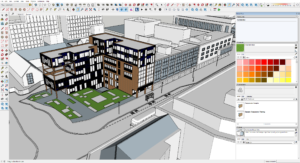
If you’re new to the world of 3D rendering, SketchUp is your friendly neighbor. Its intuitive interface makes it incredibly accessible for beginners. But don’t be fooled by its simplicity;

SketchUp is robust enough to handle complex architectural designs. It’s also backed by a vast library of models and textures, which can significantly speed up your workflow.

Revit

Revit, another gem from Autodesk, is tailored more towards architects and designers focusing on building information modeling (BIM). What sets Revit apart is its ability to create coherent and interconnected models.

Changes made in one view update across all views, ensuring consistency and accuracy in your designs. It’s a game-changer for collaborative projects and large-scale architectural endeavors.

Rhino 3D

Rhino 3D steps in when you’re dealing with complex geometries and non-standard shapes. Renowned for its mathematical precision in model creation, Rhino is the go-to for architects who love to push the boundaries of traditional design.

Its compatibility with numerous design, drafting, CAM, engineering, and analysis software makes it a versatile tool in a multi-software workflow.

Cinema 4D

Dipping into the realm of motion, Cinema 4D is perfect for architects who want to add an extra flair to their presentations with animations.

Known for its ease of use in the world of motion graphics, it allows you to create stunning walkthroughs of your 3D models, adding a dynamic layer to your presentations.

Step by Step Rendering Process for House Plan

Transforming a house plan into a 3D rendering is like taking a journey from a sketch to a lifelike model. Let’s walk through this process step by step, unveiling how each stage contributes to creating a stunning visual representation of a house plan.

Step 1: Gathering and Preparing Your Resources

Before diving into the digital world, you need to gather all your resources. This includes the house plan, any reference images, and specific details about materials and textures.

Preparing these resources ensures that you have a clear roadmap for your rendering process.

Step 2: Modeling the Basic Structure

The first digital step is to create the basic structure of your house. This involves translating the 2D floor plan into a 3D model. Whether you’re using SketchUp, Revit, or any other software, this is where you set the foundation, shaping walls, floors, roofs, and other structural elements. Precision is key in this step to ensure accuracy in the overall model.

Step 3: Adding Textures and Materials

Once the basic structure is in place, it’s time to breathe life into it with textures and materials. This is where you apply brick textures to walls, wooden finishes to floors, and so forth. Choosing the right textures can significantly enhance the realism of your model.

It’s a creative process, but also one that demands attention to detail and an understanding of how materials interact with light.

Step 4: Incorporating Furniture and Decor

No house is complete without furniture and decor. This step involves populating your 3D model with furniture, fixtures, and other decorative elements. This is where you get to add personality and style to the space. It’s also a chance to experiment with different layouts and design themes.

Step 5: Setting Up Lighting

Lighting can make or break your 3D rendering. Proper lighting highlights the best features of your design and adds depth and atmosphere to the space.

You’ll need to consider both natural and artificial light sources, ensuring they accurately reflect how the space will look at different times of the day.

Step 6: Final Rendering

Now, it’s time for the final rendering. This is where your model gets processed into a high-quality image or animation.

Depending on the complexity and desired quality, this step can take anywhere from minutes to hours. It’s a waiting game, but seeing your vision come to life is incredibly rewarding.

3D Rendering Challenges in Architecture Space

Navigating the intricate world of 3D rendering in architecture comes with its set of challenges. Understanding these hurdles is crucial for anyone stepping into this realm, whether you’re a seasoned professional or a budding designer.

Balancing Realism and Resources

One of the biggest challenges in 3D rendering is striking the right balance between realism and the resources at your disposal.

High levels of detail can lead to stunning visualizations, but they also demand more time, processing power, and expertise. It’s a delicate balancing act, where you must align your vision with practical constraints.

Ensuring Accuracy and Consistency

Accuracy and consistency are the backbones of architectural rendering. A minor discrepancy between the render and the actual plan can lead to significant issues down the line.

This means constantly cross-checking your model with the original plans and specifications, a meticulous and sometimes tedious process.

Managing Client Expectations

Clients often have high expectations from 3D renders, sometimes expecting photo-realistic outcomes.

However, achieving such levels of realism isn’t always feasible within the constraints of time and budget. Clear communication and managing expectations from the start can help mitigate this challenge.

Navigating Software Complexity

The complexity of 3D rendering software can be daunting. Each tool comes with its learning curve, and staying updated with new features and techniques is a continuous process.

For beginners, this complexity can be overwhelming, but patience and practice are key.

Dealing with Hardware Limitations

High-quality 3D rendering requires robust hardware. Unfortunately, not everyone has access to high-end computing power.

This limitation can affect the quality and speed of your renders, making it a significant challenge for many architects and designers, especially those just starting out or working with limited budgets.

Coping with Long Rendering Times

Rendering, especially at high qualities, can be time-consuming. This wait can be frustrating and can slow down the overall project timeline.

Efficient workflow management and realistic scheduling are essential to mitigate the impact of long rendering times.

Frequently Asked Questions (3D Rendering of House Plans)

How much does it cost to 3D model a house?

The cost of 3D modeling a house varies widely, typically ranging from $500 to $4,500, depending on the project’s complexity, detail level, and the professional’s expertise. The cost factor is influenced by several elements, including the size of the house, the level of detail required in the model, and the experience of the 3D artist or firm.

More complex projects with intricate details or those requiring high-end rendering techniques will be at the higher end of the cost spectrum. It’s always advisable to get quotes from different professionals to find a balance between quality and budget.

Is there an app to convert floor plan to 3D?

Yes, there are apps available that can convert floor plans to 3D models. Popular choices include SketchUp, Floorplanner, and Homestyler. These apps vary in functionality and complexity. Some, like SketchUp, offer detailed modeling capabilities suited for professionals, while others like Floorplanner and Homestyler are more user-friendly, catering to homeowners and DIY enthusiasts.

These apps allow users to input floor plans and then transform them into 3D models, offering a virtual walkthrough of the space.

How to create 3D house plans?

Creating 3D house plans typically involves using specialized software like SketchUp, Revit, or AutoCAD to transform 2D floor plans into three-dimensional models. The process starts with importing or drawing the 2D floor plan in the software. Then, you’ll use various tools within the software to build walls, add floors, and insert architectural elements like doors and windows.

The final step involves adding textures, colors, and furnishings to bring the house plan to life. It’s a skill that requires practice, but many online tutorials can guide beginners through the process.

How much does a 3D floor plan cost?

The cost of a 3D floor plan can range from $250 to $750 per floor, depending on the complexity and the level of detail required. This price variation depends on factors such as the size of the property, the number of rooms, and the inclusion of furnishings and details.

Customization, like unique textures or furniture designs, can also affect the price. As with any service, it’s beneficial to compare offerings from different providers to ensure you receive a fair price for the quality of work you expect.

3D Modeling and Rendering in Architecture

If you’re venturing into architecture, you’ve probably realized the importance of 3D modeling and rendering. It’s a game-changer in the field, bringing designs to life and changing how projects are presented. It’s essential for architects, students, and enthusiasts alike to get a grip on this tech to stay ahead in this ever-evolving industry.

3D modeling and rendering in architecture are essential for visualizing designs before construction, allowing for adjustments and improvements. This process enhances client understanding, saves time and resources, and facilitates better design decisions.

The journey through this blog will unfold the intricacies of 3D modeling and rendering in architecture. You’ll discover how these tools bring designs to life, the impact they have on the architectural process, and why they are indispensable in modern architecture.

Fundamentals of 3D Modeling

3D modeling is the process of creating a mathematical representation of any three-dimensional surface or object via specialized software.

It’s like sculpting, but in the digital world. Imagine you’re a sculptor, but instead of clay or marble, your material is pixels and your tools are algorithms.

Types of 3D Models

There are primarily two types of 3D models: solid and surface models. Solid models define the volume of the object they represent and are more realistic, but also more complex. They’re like the bones and flesh of a building, providing a complete view from every angle.


On the other hand, surface models are more like the skin, representing only the surface of an object. These are often used in applications where internal details are less important, like in video games or movies.


In architecture, solid models are paramount. They allow you not only to visualize the exterior of a building but also to delve deep into the intricacies of its interior. It’s like having X-ray vision, where you can see the load-bearing structures or the HVAC system as easily as the façade.

Popular 3D Modeling Softwares

When it comes to choosing the right software, the plethora is both a blessing and a maze. Some of the most popular 3D modeling software in architecture include AutoCAD, SketchUp, and Revit. Each has its unique strengths.


  • AutoCAD, a veteran in the field, is known for its precision and is widely used for technical drawings.
  • It’s like the Swiss Army knife of 3D modeling – reliable and versatile.
  • SketchUp, meanwhile, is more intuitive and user-friendly, making it a favorite for beginners or those looking to quickly bring their ideas to life.

From my personal experience, Revit stands out for architectural 3D modeling. It’s not just about creating standalone models; it’s about creating intelligent, interconnected systems that reflect how buildings truly come together.

Imagine constructing a digital twin of a building where every element is in sync, from the architectural design to the electrical systems.

3D Rendering: What is it and how does it work?

Imagine you’re a painter, and you’ve just finished sketching the outline of a beautiful landscape. Now, it’s time to bring it to life with colors, textures, and lighting. This is what 3D rendering is to the world of architecture and design.

It’s the process of adding lifelike qualities to a 3D model, transforming it from a wireframe into a vibrant, realistic image. This magic happens through rendering software, which uses complex algorithms to simulate light, shadows, textures, and other physical properties.

Rendering Process

The rendering process is a fascinating journey from model to masterpiece. It begins with your 3D model. The software then layers this skeleton with textures, resembling the materials you’d see in real life, like brick, glass, or wood.

The final step is lighting, which breathes life into the model. It’s like the sun rising, casting light and shadows, and revealing the full glory of the landscape.


But it’s not just about slapping on textures and lights. The rendering process is both an art and a science. It requires an understanding of how materials interact with light, how textures convey emotion, and how the right angle can tell a story.

Real-time vs. Pre-rendering

Real-time rendering, as the name suggests, happens in, well, real time. It’s the technology behind video games and virtual reality, where the images are rendered on the fly as you interact with the environment. It’s like improvisational theater, where the performance changes based on the audience’s reactions.

Pre-rendering, on the other hand, is like a meticulously planned Broadway show. Every detail is crafted in advance, allowing for higher quality and more complex effects. This method is often used in architecture and film, where each frame can take hours to render, but the result is a visual feast, rich in detail and realism.

Lighting and Texturing in Rendering

Lighting in rendering is what makes or breaks the realism of your architectural visualization. It’s about understanding how light behaves – how it bounces off surfaces, creates shadows, and sets the mood.

Texturing, on the other hand, is about giving surfaces a sense of touch and feel. It’s the difference between looking at a brick wall and feeling its roughness in your mind.


Differences between 3D modeling and 3D rendering.

Differences between 3D modeling and 3D rendering is like differentiating between the architect who designs a building and the painter who brings it to life with color and texture.

Both are essential in the creation of architectural masterpieces, yet their roles, tools, and outcomes are distinct.

Purpose

The purpose of 3D modeling is to create a digital skeleton of an object. It’s the process of constructing the form, dimensions, and structure, much like an architect drawing up blueprints.

In contrast, 3D rendering is about bringing this model to life. It’s like the stage where a painter adds colors, textures, and lighting to a sketch, transforming it into a vivid, realistic image.

Tools and Techniques

For 3D modeling, tools like AutoCAD, SketchUp, and Revit are often used. They allow architects and designers to build precise, detailed models. Techniques involve creating wireframes, adding geometrical shapes, and defining dimensions.

3D rendering, however, relies on software like V-Ray or Lumion, which focus on adding realistic lighting, shadows, and textures. The techniques are more about visual effects and photorealism, like choosing the right angle of sunlight or the texture of brick walls.

Application in the Design Process

3D modeling is the first step in the architectural design process. It’s where you flesh out the dimensions and spatial relationships of a building. 3D rendering, on the other hand, comes later. It’s used to create compelling visuals to convey the final look of the project.

It helps in showcasing the design to clients or stakeholders, providing them with a tangible, realistic view of the end product.

Output and Visualization

The output of 3D modeling is a digital model – a representation of the structure in three dimensions. It’s like looking at a digital clay model of a building. The output of 3D rendering, however, is a lifelike image or animation.

It’s akin to viewing a photograph of the finished building, complete with textures, colors, and lighting that evoke emotions and give a sense of realism.

Time and Resource Investment

3D modeling can be relatively quick, depending on the project’s complexity. It’s about building the structure, which can be straightforward for experienced designers. Rendering, though, is more resource intensive.

It requires powerful hardware and more time, especially for high-quality outputs. The level of detail in lighting and texturing can turn rendering into a time-consuming process.

Which is better 3D Modeling or 3D rendering for Architecture?

When it comes to architecture, the debate between the supremacy of 3D modeling and 3D rendering is like comparing the importance of a hammer to a paintbrush in building a house. Both are indispensable tools in the architectural process, each serving its unique purpose and complementing the other.

Impact on Client Presentation

When presenting to clients or stakeholders, 3D rendering often takes the front seat. It’s the tool that helps people without technical architectural knowledge to visualize the final project. A beautifully rendered image or animation can evoke emotions and excitement, making it a powerful tool for winning pitches and getting project approvals.


3D modeling, while less glamorous in presentations, is crucial for making accurate and informed decisions during the design process. It’s more about function than form, but without it, the form might not stand up to real-world constraints.

Technical Requirements and Skills

3D modeling demands a strong understanding of architectural principles, mathematics, and spatial awareness. It’s a skill that requires precision and attention to detail. Rendering, on the other hand, requires an artistic touch, an understanding of lighting, texture, and color theory. It’s more about creating a mood and less about structural accuracy.

Integration in the Architectural Workflow

In the workflow of an architectural project, 3D modeling and rendering play different, but equally important roles. Modeling is a continuous process that evolves through the design phase, constantly adapting to new information and changes in the project.

Rendering, while it can occur at various stages, is often most impactful in the final stages, where it’s used to showcase the completed design in its best light.

Conclusion

3D modeling and rendering stand as crucial tools. They transform abstract ideas into vivid, tangible representations, significantly improving communication between architects and clients, and elevating the overall quality and efficiency of architectural projects.

As we wrap up, it’s clear that 3D modeling and rendering are more than just digital tools; they are the bridge between an architect’s vision and the client’s understanding.

They empower architects to explore creative realms, ensuring that every angle, texture, and light in a design is as close to reality as possible. Embracing these technologies will not only improve your designs but also elevate your architectural storytelling.

Frequently Asked Questions (3D Modeling and Rendering in Architecture)

What is architectural 3D rendering?

Architectural 3D rendering is the process of creating two-dimensional images or animations showing the attributes of a proposed architectural design. These images are generated using 3D software, showcasing the design’s realistic aspects, such as textures, lighting, and materials.

What is 3D modeling and rendering?

3D modeling and rendering in architecture involve creating a digital model of a structure and then producing realistic images or animations from it. This process allows architects to visualize and refine buildings before they are constructed.

What is 3D model in architecture?

A 3D model in architecture is a digital representation of a building or structure, constructed within a three-dimensional framework. It allows architects to explore design elements in a virtual space, offering a detailed view of the project.

What are the 4 types of architectural rendering?

Photorealistic rendering creates detailed, life-like images, while conceptual rendering emphasizes ideas with less detail. Walkthroughs are animated videos that showcase a design, and virtual tours offer an interactive 3D exploration of a space, enhancing client presentations with immersive experiences.

Architectural Visualization Techniques

If you’re delving into the world of architectural visualization, it’s likely because you recognize the immense value it adds to architectural projects. The ability to visually communicate design ideas is crucial in architecture, as it bridges the gap between conceptualization and realization. In a field where every detail counts, having the tools and techniques to accurately portray your vision is indispensable.


Architectural visualization techniques encompass a range of practices, from 3D modeling and photorealistic rendering to the integration of environmental elements and the use of color theory, aimed at enhancing the representation and understanding of architectural designs.


This blog is a deep dive into the diverse techniques that make architectural visualization a powerful tool. Whether you’re a seasoned architect or a student starting out, these insights will equip you with the knowledge to bring your architectural visions to life with clarity and creativity.

12 Techniques To Improve Your Architectural Visualizations

1. Utilizing Advanced 3D Modeling Software

In the realm of architectural visualization, the use of advanced 3D modeling software stands as a cornerstone. It’s not just about creating structures; it’s about breathing life into them.

With software like SketchUp, Revit, or Rhino, you have the power to build complex models with intricate details. Imagine sculpting your designs layer by layer, where each element, from the curve of a staircase to the texture of a brick, is at your fingertips.

2. Incorporating Realistic Lighting and Textures

Now, let’s talk about lighting and textures. They are, without a doubt, the magic ingredients that transform good visualizations into great ones. When you skillfully combine natural and artificial light sources, you create a mood, an atmosphere that speaks volumes.

The play of shadows, the soft glow of dawn, or the harsh midday sun – each tells a different story. And textures? They add depth and realism. A rough concrete wall, a sleek glass panel, or a rustic wooden floor – each texture you choose adds character to your visualization.

3. Implementing Photorealistic Rendering

Photorealistic rendering is like the grand finale of architectural visualization. This is where your model transcends from a digital construct to something that looks and feels real. It’s the process of rendering your models so meticulously that they mirror reality.

The key here is attention to detail – the reflection on glass, the way light diffuses through a fabric, the shadow a tree casts. It’s a symphony of light, shadow, and texture. Remember, the goal is to make the viewer pause and question, “Is this real?”

4. Exploring Different Architectural Styles

Variety is the spice of life, and this couldn’t be truer in the world of architectural visualization. Exploring different architectural styles is not just about aesthetics; it’s about understanding and respecting the philosophy behind each style.

Be it the minimalist charm of modernism, the ornate details of baroque, or the sustainable ethos of contemporary eco-design, each style offers a unique perspective. Embracing this diversity not only broadens your design horizons but also makes your portfolio more appealing to a wider range of clients.

5. Integrating Natural Environments and Landscaping

Buildings don’t exist in isolation; they are part of a larger ecosystem. This is where integrating natural environments and landscaping comes into play. It’s about creating harmony between your structure and its surroundings.

Picture a serene garden that complements a modern villa or a rugged landscape that enhances a mountain retreat. Landscaping is not an afterthought; it’s an integral part of the design that adds context and completeness to your visualization.

6. Emphasizing Scale and Proportions

A building that’s out of scale can feel alien, while correct proportions bring a sense of balance and harmony. It’s like the difference between a building that just looks impressive and one that feels right.

In my experience, paying close attention to scale not only improves the realism of the visualization but also helps in communicating the true essence of the design to the client.

7. Utilizing Virtual Reality for Immersive Experiences


Imagine walking through a building before it’s even built. That’s the magic of virtual reality (VR) in architectural visualization. VR takes your models off the screen and into a three-dimensional space, where you can experience the design as if you were physically there.

This immersive experience is invaluable, not just for architects and designers, but also for clients and stakeholders. It allows for a deeper understanding and connection with the project. From personal experience, presenting a project in VR often elicits a ‘wow’ factor and helps in making more informed decisions.

8. Applying Color Theory in Design

Color is a powerful tool in the architect’s palette. It can influence mood, define spaces, and even affect the perceived size of a room. Understanding and applying color theory is essential in architectural visualization.

The right color combinations can bring vibrancy and life to your designs. It’s about more than just aesthetics; it’s about creating an emotional response. Whether it’s the calming blues of a bedroom or the energizing yellows of a kitchen, color can transform a space. Remember, the colors you choose are as important as the materials and textures.

9. Creating Detailed Interior Visualizations


Interior visualizations are where you get to showcase the livability of a space. It’s not just about the walls and floors; it’s about creating a scene that someone can imagine themselves in. This involves meticulous attention to detail – from the furniture layout to the lighting, from the artworks on the walls to the cushions on the sofa.

Each element adds to the story of the space. As someone who has spent hours perfecting the placement of a vase, I can attest to the difference these details make in bringing an interior visualization to life.

10. Employing Aerial and Drone Photography


Aerial and drone photography has revolutionized the way we view and present architectural projects. It provides a unique bird’s-eye view, offering a comprehensive perspective of the property, its surroundings, and its relation to the landscape.

This technique is especially useful for large-scale projects, as it captures the scope and scale in a way that ground-level photography can’t. Aerial shots add drama and a sense of grandeur to your presentations, making them more engaging and informative.

11. Using Post-Processing Techniques

Post-processing is where good visualizations are polished into great ones. This stage involves editing your renders to enhance colors, adjust lighting, or add effects that weren’t possible in the 3D model.

Whether it’s adjusting the contrast for more depth or adding a lens flare for dramatic effect, post-processing gives you the control to fine-tune your images to perfection.

12. Incorporating Human Elements for Scale

Last but not least, incorporating human elements into your visualizations is crucial for conveying scale and relatability. Adding people to your renders helps viewers understand the size and scale of a space. It also adds a layer of realism and context. When people see others interacting with the space, whether it’s someone reading in a corner or a group chatting in a lobby, it helps them envision how the space can be used.

It’s a small detail that makes a big difference in making your visualizations more approachable and engaging.

What are Digital 3D Modeling Techniques

Digital 3D modeling techniques are the backbone of creating realistic and immersive architectural visualizations. These techniques involve using specialized software to create three-dimensional representations of buildings and structures.

Imagine being able to construct a building from the ground up in a virtual environment, where every brick, window, and design element can be manipulated and viewed from all angles. This is what 3D modeling offers.


One popular technique in 3D modeling is polygon modeling. It’s a process where you create a mesh out of points, lines, and faces. This method is incredibly versatile, allowing for high levels of detail in your models.

It’s perfect for creating complex architectural structures with intricate designs. The key here is understanding how to efficiently use polygons to create realistic forms without overloading the model with unnecessary details.

Another technique widely used is NURBS (Non-Uniform Rational B-Splines) modeling. This method is fantastic for creating smooth, curved surfaces like intricate staircases or sleek building facades. NURBS modeling is about precision and fluidity, ideal for designs that require a high level of accuracy.

Conclusion

The field of architectural visualization is a dynamic blend of art and technology, requiring a deep understanding of various techniques to bring architectural concepts to life.

In conclusion, mastering architectural visualization techniques is more than just learning software or following trends. It’s about understanding the intricacies of visual communication and how it can enhance the storytelling of architectural designs. As you venture further into this field, keep an open mind to the endless possibilities these techniques offer.

My suggestion? Experiment, explore, and don’t be afraid to blend different methods to find your unique style. Your journey in architectural visualization is not just about rendering buildings; it’s about crafting visual narratives that resonate and inspire.


Frequently Asked Questions (Architectural Visualization Techniques)

What is architectural visualization?

Architectural visualization is the practice of creating digital models and images that represent architectural designs. This process involves various techniques, including 3D modeling, rendering, and virtual reality, to create lifelike images and animations of buildings, helping in design decision-making and marketing.

How do you visualize architecture?

To visualize architecture, architects start by creating a basic structure in a 3D space, then add details like textures, lighting, and landscaping. The goal is to create a visual that accurately conveys the design’s look, feel, and function.

What are visuals in architecture?

In architecture, visuals are images or representations that depict the design and features of a building. They provide a tangible way for clients and stakeholders to understand and engage with a project. These visuals are created using various techniques and software, offering an accurate and compelling view of the proposed architectural designs.

What are the techniques of architectural rendering?

Architectural rendering involves techniques like 3D modeling, texturing, and lighting to create realistic images of buildings. 3D modeling lays the foundation, while texturing and lighting add realism and depth. Post-processing is where the render is refined, adjusting aspects like color balance and contrast to create an accurate representation of the architectural design.